Manage the LaunchPad CC3200 boards
The LaunchPad CC3200 platform includes three variants: LaunchPad CC3200, LaunchPad CC3200-S and LaunchPad CC3200-SF.
Install
To install the CC3200 LaunchPad,
- Please follow the instructions provided at Setup Energia on Linux .
Warning
On the LaunchPad CC3200, analog inputs are limited to 1,5 V. Higher voltages may damage the MCU.
Develop
The LaunchPad CC3200 supports two frameworks: Energia and Energia MT based on TI-RTOS.
Upload
Debug
 The LaunchPad CC3200 WiFi requires a specific hardware configuration.
-
Unplug the LaunchPad CC3200 WiFi board.
-
Remove the wire from
JTAG J8(emulator side) toSOP 2(CC3200) side. -
Place the
TCK J8jumper. -
Place the
SOP 2jumper.
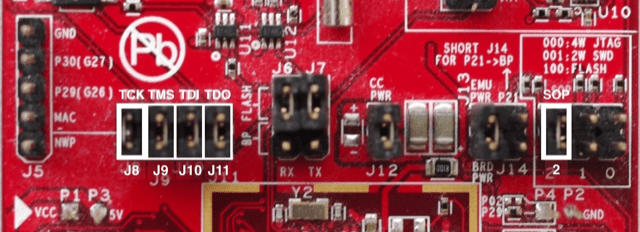
Debugging requires TCK and SOP 2 jumpers placed on
- Plug the LaunchPad CC3200 WiFi board.
The project is uploaded into SRAM and is lost in case the power is disconnected. For more information,
- Please refer to Upload to LaunchPad CC3200 WiFi.